ShopDreamUp AI ArtDreamUp
Deviation Actions


Suggested Deviants


Suggested Collections


You Might Like…



Description
If you need help/support fast, then post your question here as a comment: www.joshoon.com/posts/563
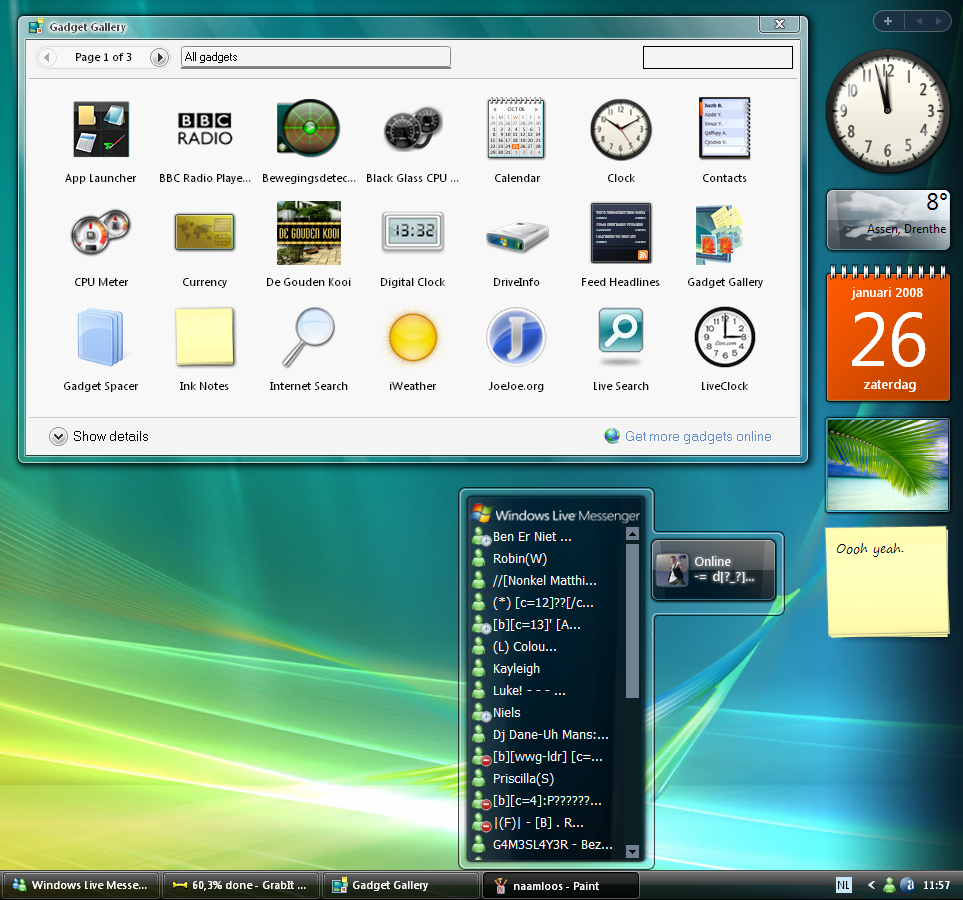
This is the real Sidebar scripted for Windows XP...
You can add all kind of Gadgets from the Live Gallery and that stuff.
The sidebar haves all orginal icons (Of course, because this is the real one lol)
Important: Extract all the files in the rar-file with winrar before installing!
Readme is included for help and info.
I hope you enjoy.
ALSO VISIT MY WEBSITE: www.joshoon.com
About my music and stuff.
Thanks!
Comments?
UPDATE:
How to make the sidebar like in Windows 7!
1. Drag the gadget(s) out of the sidebar somewhere in your desktop.
2. Right click on the sidebar (The dark shadow blurred thing) and click 'Close sidebar' (Or something like that)
The sidebar will minimize now, but it stays running, and your gadgets will stay on your desktop.
Enjoy!
Note:
The software is not made by me, I only put all the software together in a pack so you can use it on XP easily.
I am also not responsible for any possible damage to your system.
If you need any support, you can contact me with a comment in here, or contacting me via my website www.joshoon.com.
You can also add me on msn: fans@djjoshoon.com (Emails will not be readed, and I will not be much online on this msn, because this is not my personal msn, this is msn is for people that like my music, or my sidebar pack ^^)
I can not fix any errors in the software.
Credits in README file.
FAQ:
Q: A gadget does not work correctly, it stays blank or an other error occures, can this be fixed?
A: This could be because the gadget is scripted to work on Windows Vista/7, and those scripts won't work on XP.
This cannot be fixed.
But gadgets like clock, weather, calender, and stuff like that should work normaly.
But gadgets like CPU use may need a Windows Vista/7 system, because those scripts are written for Vista/7.
But most gadgets should work!
Q: The sidebar will not start, an error occures when I try to start the sidebar
A: It depends on what kind of error you get, but it could be because you have not installed the newest .NET Framework.
I recommend .NET Framework 3.5 or higher. It can be downloaded from Microsoft.
More faqs will be added later.
----------------------------------------------------------------
I am also a eurodance/handsup producer and vocalist.
If you wanna check out some of my music, you can check out my website www.joshoon.com
Or my YouTube account: www.youtube.com/user/JoshoonJH
This is the real Sidebar scripted for Windows XP...
You can add all kind of Gadgets from the Live Gallery and that stuff.
The sidebar haves all orginal icons (Of course, because this is the real one lol)
Important: Extract all the files in the rar-file with winrar before installing!
Readme is included for help and info.
I hope you enjoy.
ALSO VISIT MY WEBSITE: www.joshoon.com
About my music and stuff.
Thanks!
Comments?
UPDATE:
How to make the sidebar like in Windows 7!
1. Drag the gadget(s) out of the sidebar somewhere in your desktop.
2. Right click on the sidebar (The dark shadow blurred thing) and click 'Close sidebar' (Or something like that)
The sidebar will minimize now, but it stays running, and your gadgets will stay on your desktop.
Enjoy!
Note:
The software is not made by me, I only put all the software together in a pack so you can use it on XP easily.
I am also not responsible for any possible damage to your system.
If you need any support, you can contact me with a comment in here, or contacting me via my website www.joshoon.com.
You can also add me on msn: fans@djjoshoon.com (Emails will not be readed, and I will not be much online on this msn, because this is not my personal msn, this is msn is for people that like my music, or my sidebar pack ^^)
I can not fix any errors in the software.
Credits in README file.
FAQ:
Q: A gadget does not work correctly, it stays blank or an other error occures, can this be fixed?
A: This could be because the gadget is scripted to work on Windows Vista/7, and those scripts won't work on XP.
This cannot be fixed.
But gadgets like clock, weather, calender, and stuff like that should work normaly.
But gadgets like CPU use may need a Windows Vista/7 system, because those scripts are written for Vista/7.
But most gadgets should work!
Q: The sidebar will not start, an error occures when I try to start the sidebar
A: It depends on what kind of error you get, but it could be because you have not installed the newest .NET Framework.
I recommend .NET Framework 3.5 or higher. It can be downloaded from Microsoft.
More faqs will be added later.
----------------------------------------------------------------
I am also a eurodance/handsup producer and vocalist.
If you wanna check out some of my music, you can check out my website www.joshoon.com
Or my YouTube account: www.youtube.com/user/JoshoonJH
Social
Twitter: www.twitter.com/joshoon
Facebook: www.facebook.com/joshoon
Instagram: www.instagram.com/joshoon
© 2008 - 2024 joshoon
Comments296
Join the community to add your comment. Already a deviant? Log In

does it work for windows 10??